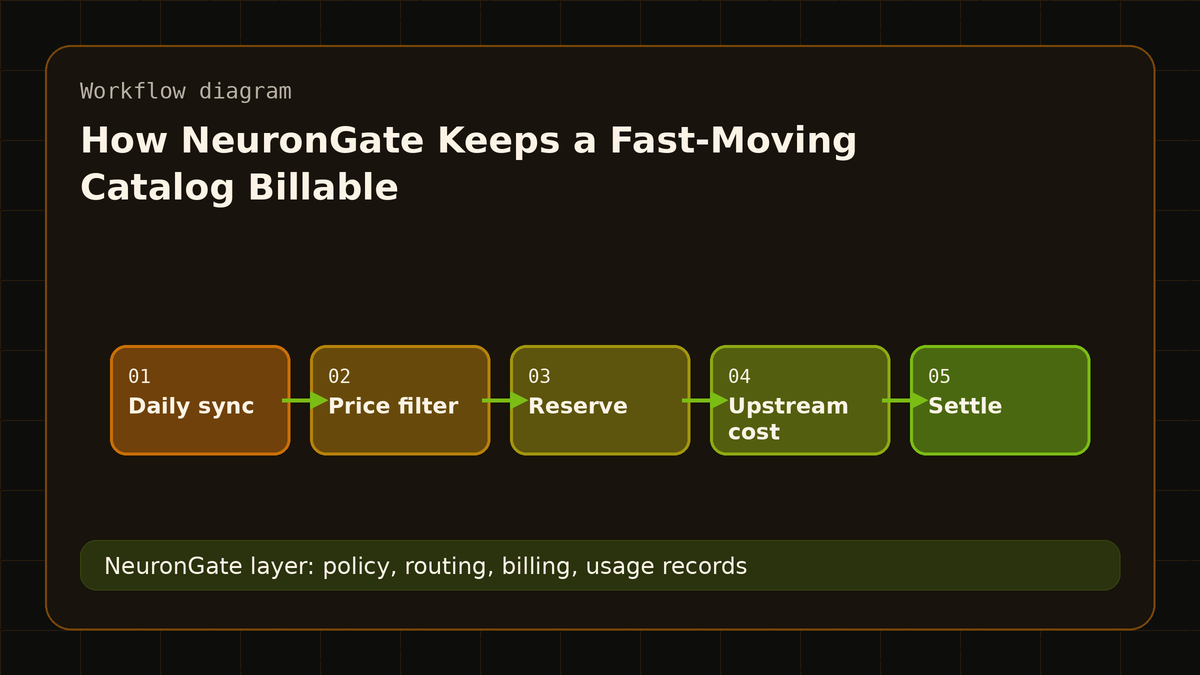
Between July and October 2026, Anthropic alone shipped Opus 5, Fable 5.1, Opus 5.5, Sonnet 5.5 and Haiku 5.5, and OpenAI's SDK gained four GPT-6 identifiers. NeuronGate's catalog keeps up without manual work: it syncs from our upstream model list every day and adds new models as they appear.
Adding models fast is the easy part. Billing them correctly is the part that matters to you. Here is how the catalog handles it.
1. Only models with a real per-token price get in
Every model in the catalog is billed per token at a published price. Some upstream listings don't fit that:
- Free variants (
:free), which come with tight rate limits and no per-token price. - Variable-price routes, listed with a placeholder price because the real cost depends on which model ends up answering.
- Models with a zero price on both input and output.
None of these are added to the catalog, and if a model we already list switches to variable pricing, it is taken offline rather than billed at a price that no longer reflects its cost.
2. Long prompts are billed at their real tier
Several new models charge more once a prompt passes a length threshold. Claude Haiku 5.5, for example, costs five times as much per token above 100K prompt tokens. Model catalogs, ours included, list one base price.
So for every request, NeuronGate compares two numbers: the base price times your tokens, and what the upstream provider reports it charged. You are billed the higher of the two. Short prompts pay the listed price; long prompts pay their real tier instead of being silently under-counted.
3. Reservations cover the worst case
Before a request is sent, NeuronGate reserves its worst-case cost from your balance: your prompt plus the full output budget. If you didn't set max_tokens and your balance can't cover the model's full output limit, the request goes out with a smaller output budget instead of being rejected. After the response, the reservation is settled to actual usage, including for streams that end early.
4. Claude works with OpenAI-style requests
This month's Claude changes affected OpenAI-format clients:
- Claude 4.7 and later reject non-default
temperature,top_pandtop_k. When NeuronGate sends Claude requests directly to Anthropic, it leaves these parameters out for those models, so requests that set them don't fail with a 400. - Catalog ids like
anthropic/claude-opus-4.8are mapped to Anthropic's own model names (claude-opus-4-8) on the direct route.
What this means for you
- New models show up without you asking. Check the model catalog for current ids and prices.
- Long prompts are billed correctly. You pay the listed price, or the provider's actual charge when a length tier makes it higher, and every request's cost is in your usage records.
- Top-ups start at $50 in USDT, USDC, ETH or BTC, and your balance never expires.
FAQ
Why can't I find a free model in the catalog?
Free variants don't carry a per-token price and have tight upstream limits, so we don't list them. Every listed model has a paid, per-token price.
How do I know what a request cost?
Every request has a usage record with its tokens and cost. See usage, or export it as CSV.